pageo
  • Pricing
  • Profiles
Sign inStart free
pageo

Your links, your work, and every message, on one page.

Product

  • Features
  • Pricing
  • Templates
  • Examples
  • Top profiles
  • Integrations
  • Free tools
Compare
  • Linktree
  • bio.fm
  • Beacons
  • Campsite.bio
  • Taplink
  • Lnk.Bio
  • Alternatives

Resources

  • Docs
  • Changelog
  • Blog
  • Glossary
  • Link in bio guides
  • Who it's for

Company

  • About
  • Contact
  • Follow onX

© 2026 pageo

  • Terms
  • Privacy
  • Content policy
PAGEO
PAGEO
  1. Examples
  2. Saksham Dhanawat

How Saksham Dhanawat's page is built.

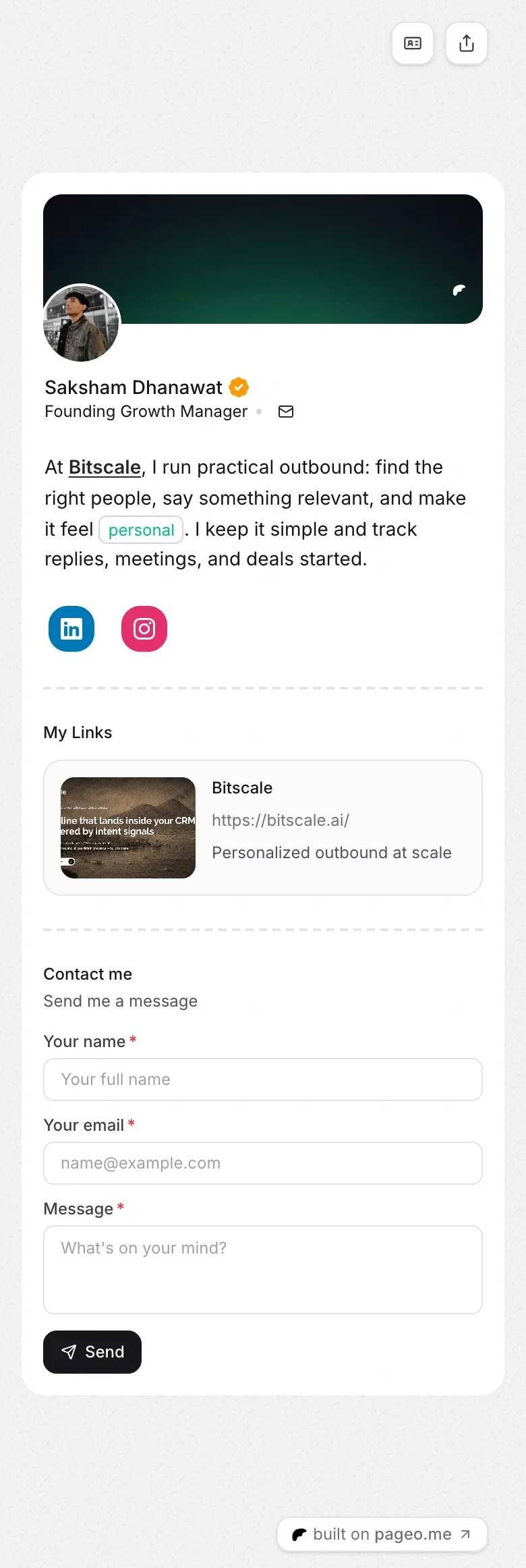
Founding Growth Manager, live at pageo.me/saksham. The sections in order, the layout, the colors, and why the page works.
Open the live page
Saksham Dhanawat's pageo page on a phone, from top to bottom

How it is built

  1. 1Socials
  2. 2Links
  3. 3Contact
Layout
List
Page color
Default
Card color
White
Links
1
Social icons
2

Why it works

  • The bio says what the owner does at work in two sentences, links the company name inline, and highlights one word, personal.
  • One link, the company site, in the list layout, gives the page a single obvious next click.
  • A contact form follows for people who want to talk about the work directly.

More examples

  • Sakshi HedauThe page stays short: the role Lawyer, a two-line bio, and two social icons, Instagram and LinkedIn.See how it is built
  • SanyamThe bio is three short lines in a casual voice, with the word code set as an inline highlight, and it ends by pointing to the form below.See how it is built
All examples
Instagram
GitHub

Your whole internet, one link.

Claim your page in under a minute. No card needed.

pageo.me/
alex